If your cloud storage is free, you pay with your data. How to easily move to a secure storage like Proton Drive - and when not to
Companies are profit-oriented. If their service is free, you pay with your data.
Enjoying free cloud storage means you are allowing the company to quietly scan your private tax returns, family photos, medical records, and business documents. In 2026, mainstream providers actively harvest your personal files to train their massive Artificial Intelligence models and build highly lucrative advertising profiles.
Examples where big cloud providers got caught red-handed
The problems with free cloud drives are not just fearmongering. You actually agree to this surveillance when accepting their Terms of Service. Here are examples where presumedly friendly companies were caught red-handed, arms-deep in your files:
- Google Drive: AI model training and scanning
Google has increasingly integrated its Gemini AI directly into Google Workspace and Drive. It was found that the company uses user data, including personal documents and photos, to train its generative AI models, unless users dig through complex menus to opt out. Your private files become reading material for their corporate algorithms. - Dropbox: Sharing files with 3rd-party AI
Dropbox faced massive backlash when it was caught automatically opting users into an AI search feature that sent private user files to third-party AI partners like OpenAI. Users who thought their files were safely stored in a trustworthy service unknowingly had their sensitive documents processed by external corporate servers. - Microsoft OneDrive: The constant telemetry
Microsoft's aggressive rollout of Copilot AI across Windows and OneDrive means your synced files are constantly indexed, analyzed, and processed. Beyond AI scanning, Microsoft retains the right to scan your OneDrive files for "objectionable content," proving that they always hold the master keys to view everything you store.
What do zero-knowledge cloud storage providers do differently?
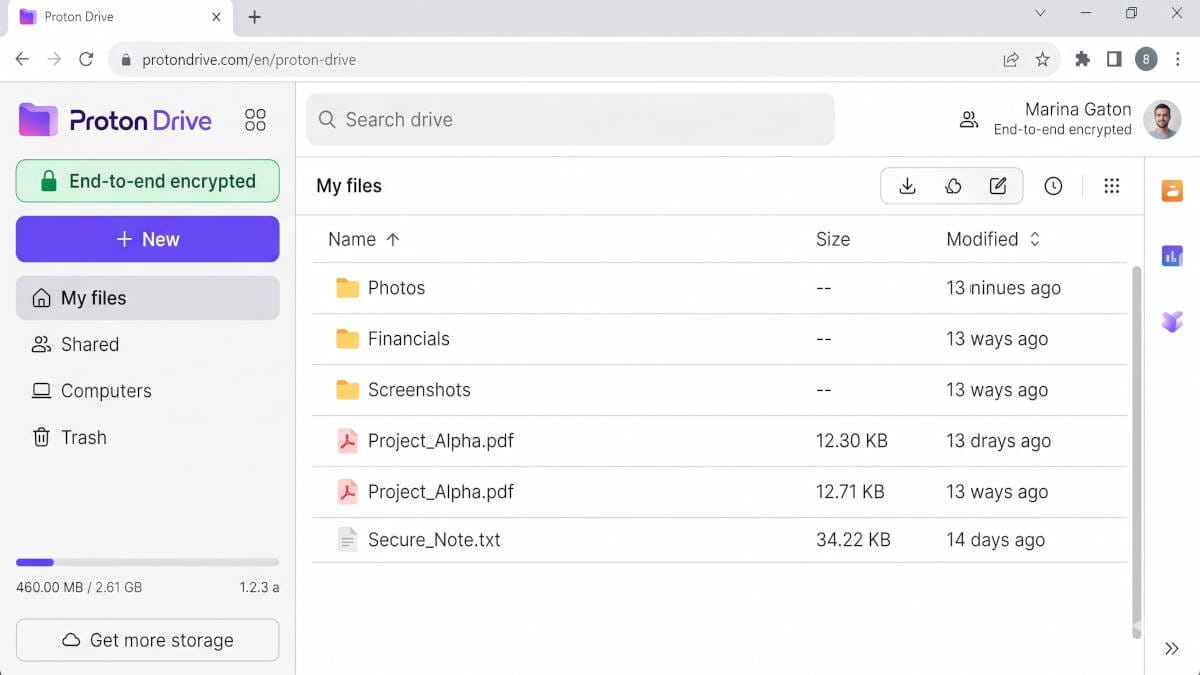
Unlike free services that parse your folders and analyze your photos, zero-knowledge providers use end-to-end encryption. This means your files and even your folder names are scrambled into unreadable code on your computer or phone before they ever reach the provider's servers.
Because the company never holds your private decryption keys, they cannot decrypt your files, feed them to an AI, or hand them over to third-party marketers.
Why Proton Drive is our favorite
Proton Drive operates under strict Swiss privacy laws, completely insulating your personal data from standard US or EU data-sharing surveillance agreements.
Beyond its powerful legal shield, the platform is entirely open source and mathematically guarantees that no one (not even Proton employees) can access your data.
It successfully combines military-grade encryption with a clean, intuitive interface, secure photo backups, and built-in encrypted document editing that non-technical users can master immediately.
You won't miss the likes of Google Docs that comes with Google Drive
The online editing and creation of office documents is something we truly don't want to miss anymore, after leaving the era when file ping-pong via email or FTP was necessary.
Proton knows this, and its drive includes a secure and encrypted collaborative office document suite.
It feels a little awkward and a bit horrifying to know that before we switched to Proton, basically none of our business documents were private.
When you absolutely should NOT use Proton Drive
Giving unbiased advise, the main drawback is that Google Drive offers some power-user niche features that are missing in Proton Drive.
Namely, while Proton Sheets does support the usual in-sheet scripting, the Apps Script in Google Sheets is something we heavily used ourselves at work and Proton Drive does not have this. Apps Script is like a build-in, additional programming platform that has access to sheets and can create sheets as well.
If you never used it, you'll likely not miss a thing. If you are depending on it it is maybe time to review the way things work in general - as we did, because it meant we had a heavy vendor-lock-in preventing us to choose the right tools.
Onboarding Proton Drive as a secure cloud provider is not a messy night shift
You do not need to move all 500 gigabytes of your data on day one. You can start by securing your most sensitive files - such as identity documents, financial records, and 2FA recovery codes - and then gradually phase out your old cloud drive over the next few months.
Step 1: Create your brand new, secure cloud vault
You will have the following options:
- Drive Plus is the lowest paid plan, giving you 200 GB of securely encrypted storage. It starts at just $3.99/m and is the perfect, hassle-free option for backing up your phone's photos and your computer's important documents.
- Proton Unlimited gives you 500 GB of storage and includes everything else you'd expect from a complete privacy ecosystem: A fast VPN, an encrypted password manager, and multiple custom email domains. This full pack starts at just $9.99/m.
- Free: Do not rely solely on the free plan for a full backup. It is extremely limited to 5GB of storage. However, it is a great way to test the interface, and the exact same military-grade encryption standards apply: Proton will not - and can not - access your data.
Choose which, highly secure and encrypted cloud storage with truly private online Docs is the right for you
Step 2: Lock down your identity and financial files first
Log in to your old Google Drive or Dropbox and download your most critical files: tax returns, passport or ID scans, medical records, and banking statements.
Because AI-driven identity theft is a dominant global threat in 2026, removing these specific high-value documents from an ad-scanned, provider-accessed server is your absolute highest priority.
Upload them directly into your new Proton Drive.
Step 3: Automate the historical import
Instead of manually dragging and dropping thousands of old files through your web browser, download the Proton Drive desktop app for Windows or Mac.
Simply install the app, and you can seamlessly copy and paste your old folders directly into your local Proton Drive folder.
The software will quietly encrypt and sync everything in the background while you work.
Step 4: Keep your old drive alive for at least a while
Do not permanently delete your old Google Drive or Dropbox account yet.
Keep it active for 30 to 60 days to ensure that all your files, shared family folders, and background mobile uploads have successfully migrated, and that any referring links in documents are updated if they are still important.
Once you are 100% confident your data is safely encrypted in your new Swiss vault, you can begin deleting the files from your old, invasive provider.